

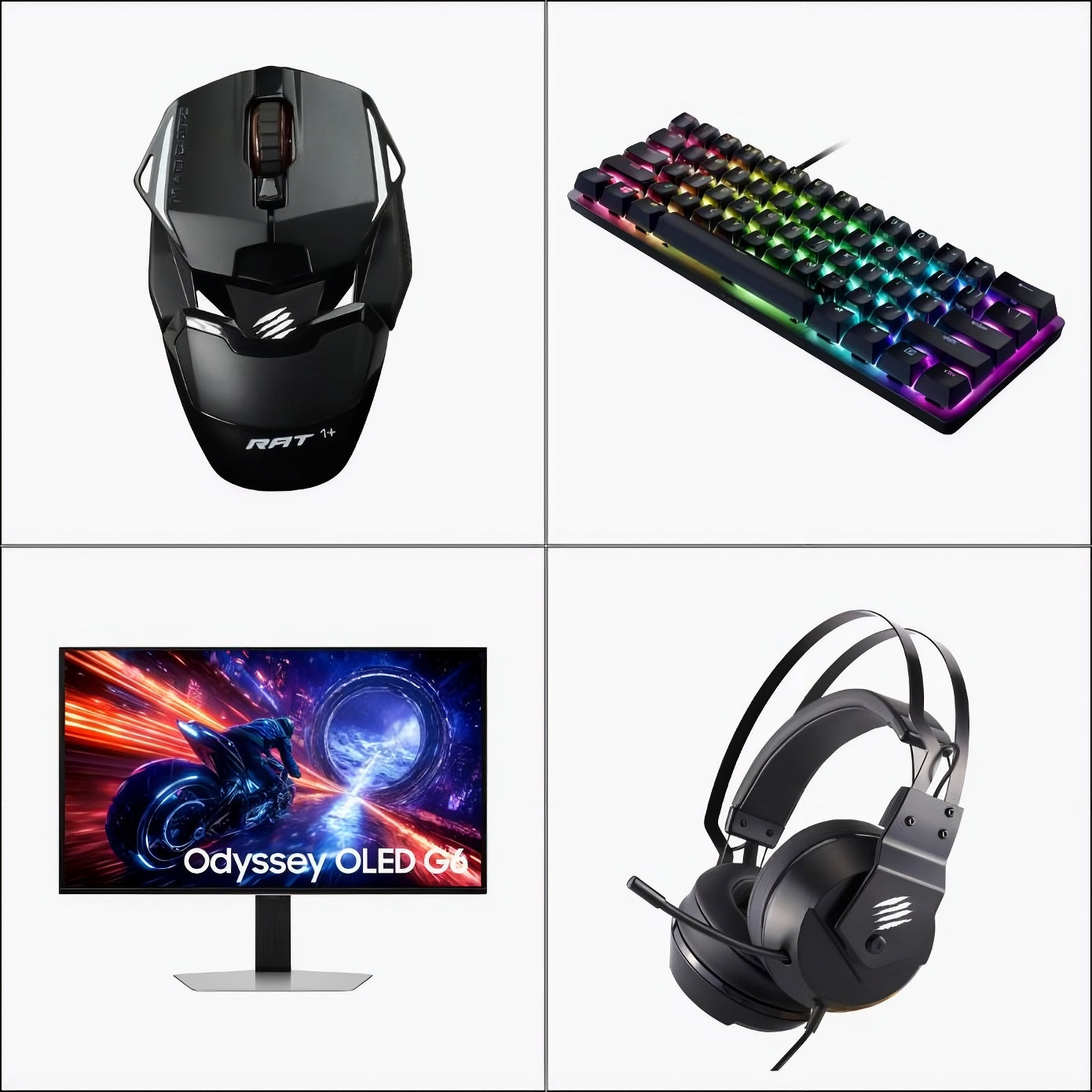
QUICK ANSWER: Gaming accessories cover everything outside the PC itself: keyboard, mouse, headset, controller, and monitor. Each one shapes how your session actually feels. At Apex300 you find keyboards and mice from Mad Catz and Razer, Samsung monitors, and wireless controllers, all with VAT included and delivery across the EU in 3 to 7 business days.

Most people focus on the PC. The gaming accessories around it are what decide whether the experience feels sharp or sluggish. A slow mouse makes aim inconsistent. A membrane keyboard misses fast keypresses. A monitor at the wrong refresh rate makes everything feel a frame behind. The right gaming accessories fix each of those problems without requiring a hardware upgrade.
This guide covers the categories that matter, what to look for in each, and what Apex300 stocks across keyboards, mice, headsets, monitors, and controllers. Every price includes VAT. Real people answer questions within 24 hours.
What Gaming Accessories Do You Actually Need?
Not every peripheral upgrades your experience equally. Some change what you feel every session. Others add comfort over hours. These are the four that make the most noticeable difference first.
Keyboard and mouse. Keyboard and mouse gaming is the foundation of PC play. A mechanical keyboard registers every press at a consistent point. A mouse with a precise optical sensor tracks movement without drift. These two are the inputs your game receives, so they directly affect what happens on screen.
Headset. Audio tells you where things are happening before you see them. A headset with clear stereo separation is useful in any game. Surround sound processing helps in shooters. In sim racing, engine and tyre audio carries information about grip and speed that no visual cue replaces.
Monitor. Resolution and refresh rate together decide how the game looks and how fast it responds. High-refresh OLED panels eliminate motion blur. The monitor does not create performance — it reveals the performance you already have.
Controller. Not every game plays well on keyboard and mouse. A wireless gaming controller removes cable drag and works at distance. For fighting games, an arcade fight stick changes the game completely.
What Apex300 Stocks Across Gaming Accessories
Apex300 carries gaming accessories from brands it knows and supports. Nothing invented, nothing stocked just to fill a catalogue.
Keyboards and Mice
Mechanical keyboards at Apex300 come from Mad Catz and Razer. The Mad Catz S.T.R.I.K.E. 4 Mechanical Gaming Keyboard uses mechanical switches in a full-size layout. The Mad Catz S.T.R.I.K.E. 2 and S.T.R.I.K.E. 13 cover different form factors in the same line.
For keyboard and mouse gaming together, Mad Catz mice run from the M.O.J.O. M1 lightweight optical to the M.O.J.O. M2 Performance Wireless. A wireless mechanical keyboard and mouse combination removes cable clutter without introducing latency at normal polling rates. The Razer Basilisk Essential and Razer Viper Mini are in the mice range for players who want Razer sensor quality at lower price points.
Monitors
Samsung monitors at Apex300 cover the Odyssey range. The Samsung 27" Odyssey OLED G6 G60SF at €899 runs OLED at 27 inches with true blacks and fast pixel response. The Samsung 32" Odyssey G5 G50F at €269 is the practical entry point. For ultra-wide, the Samsung 49" Odyssey G9 G95C at €879 handles sim racing triple-screen replacement in one panel.
Controllers
The Mad Catz T.E. 3 Arcade Fight Stick is in stock for fighting game players. For wireless gaming controller use on PC, the controller range at Apex300 carries options with both wired and wireless connectivity.
Headsets
Mad Catz P.I.L.O.T. 5 RGB and P.I.L.O.T. 3 Gaming Headsets cover audio in the range. Both are stereo headsets built for long sessions without discomfort.
VR
The Pimax Crystal VR 8G+ at €1,799 is in stock for drivers and players who want full immersion. It runs 5760x2880 resolution across both eyes and pairs with sim racing setups directly.
How to Build a Gaming Setup: The Right Order to Buy
Most buyers get this wrong. They buy a monitor first because it is the most visible upgrade, then realise the keyboard feels terrible or the mouse is holding them back. Spending in the right order makes every euro count more.
|
Step |
What to Buy |
Why It Comes First |
|
1 |
Mechanical keyboard and mouse |
These are your direct inputs. Every action on screen starts here. Fix these before anything else. |
|
2 |
Gaming headset |
Audio gives you positional information the screen cannot. Important in shooters, essential in sim racing. |
|
3 |
High-refresh monitor |
Once inputs are clean, a better screen reveals the performance you already have. OLED makes the biggest jump. |
|
4 |
Controller or fight stick |
Genre-specific. Fighting games need a fight stick. Couch gaming needs a wireless controller. Buy when the genre demands it. |
|
5 |
VR headset |
The final layer of immersion. Meaningful once the rest of the setup is solid. |
This order works whether you are starting from scratch or upgrading one piece at a time. Each step builds on the one before it.
Sim Racing and Gaming at Apex300: Two Worlds, One Store
Apex300 started in sim racing and expanded into gaming because the overlap between the two audiences is real. Drivers who race for hours also need a keyboard, a mouse, and a monitor around the rig.
For the sim racing side, the Pokornyi F499 and the full steering wheel range runs from first rims to handbuilt European options from Pokornyi Engineering. If you are comparing wheelbase options, the Simagic vs Simucube guide covers that decision in full.
Racing gaming seats and cockpit frames are a separate category. The gaming cockpits range covers Trak Racer, Sabelt, and full motion SIMRIG systems. For everything sim racing together, apex300 simracing is the full collection in one place.
Who Should Buy What at Apex300
Casual PC gamer, starting out. A mechanical keyboard and a precision mouse change how PC gaming feels immediately. Mad Catz S.T.R.I.K.E. 4 and a Razer Viper Mini is a practical starting pair that covers most genres without overspending.
Competitive or regular player. Add a Samsung monitor with high refresh rate. The 27" Odyssey OLED G6 at €899 reveals everything your GPU is already doing but your current screen is not showing.
Sim racer building a dual-purpose setup. An ultra-wide Samsung 49" handles both sim racing and desktop gaming without needing separate screens. Pair it with the sim gear from the Apex300 sim racing range for a setup that covers both.
Fighting game player. The Mad Catz T.E. 3 Arcade Fight Stick is in stock and ships across the EU. It is the correct input device for the genre, not a compromise.
Browse the full gaming accessories range at Apex300 to see current stock and pricing.
Buying from Apex300
Every price includes VAT. No extra charge at checkout. Orders dispatch in 1 to 3 business days from Finland. Delivery across Germany, Netherlands, Belgium, France, and 20 other EU countries takes 3 to 7 business days with tracking.
Returns accepted within 14 days, unused, original packaging. Refunds in 5 to 10 business days. Payment options include Klarna (pay in 3, pay in 30, or 6 to 36 month financing), Visa, Mastercard, iDEAL, Bancontact, Apple Pay, and Google Pay. Real people answer within 24 hours.
Frequently Asked Questions
What gaming accessories are worth buying first for PC?
A mechanical keyboard and a precise optical mouse make the biggest difference immediately. They directly control your inputs. Everything else, monitor, headset, controller, improves specific parts of the experience.
Does a wireless gaming controller work well for PC?
Yes. Modern wireless controllers use 2.4 GHz connections that deliver input response close to wired. For most gaming genres and all sim racing menu navigation, wireless is no longer a meaningful trade-off.
What is the difference between a wireless mechanical keyboard and a standard gaming keyboard?
A wireless mechanical keyboard uses mechanical switches for consistent keypresses and removes the cable. Standard gaming keyboards often use membrane switches that feel mushier and require more force to bottom out.
Do I need an OLED monitor for gaming?
Not for casual play. For competitive or sim racing use, OLED delivers true blacks and near-instant pixel response. The Samsung 27" Odyssey OLED G6 at Apex300 is the entry point for that level.
Can I use gaming accessories alongside a sim racing setup?
Yes. A keyboard and mouse handle menus, settings, and desktop use next to the rig. A monitor replaces or supplements the race screen. Apex300 stocks both, so the full setup ships in one order.
Share:
How to Choose the Best Sim Racing Cockpits for Your Setup
Racing Gaming Seats: What to Know Before You Buy for Your Sim Rig